MuniMins offers three ways to save speaker names, and roles, so they can be properly identified with correct spelling and attribution. Additionally, only identified individuals will be able to be recognized through Speaker Training and Identification.
The Three Roles
- Members are those who sit on a specific board and vote — your elected or appointed officials. Members must be assigned to the boards they sit on.
- Participants are those who regularly attend meetings but don't vote — your municipality staff, town counsel, department heads, and similar roles. Particpants are organization wide, and can appear in any meeting.
- Guests are those who frequently appear in meetings in a presentation role, such as Artichects to a Planning or Zoning Board. Guests must be assigned to the boards they sit on.
Board Assignment: MuniMins treats them differently because they play different roles in your minutes.
Board Members
Board members belong to specific boards. When you set up your Board in MuniMins you must add the members that sit on that board for MuniMins to be able to properly identify and structure motions for the minutes.
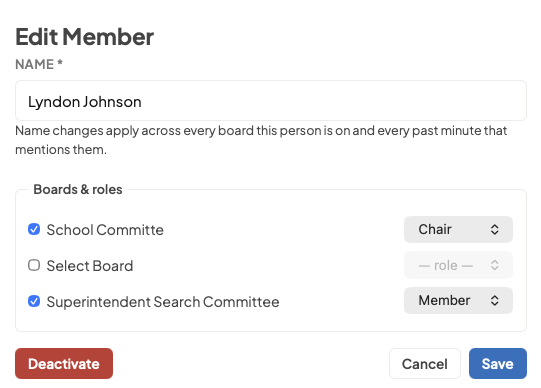
Each Member's Name and Role must be entered. For Role, MuniMins supports Chairs, Vice-Chairs, Clerks/Secretaries and Alternate Members.
The number of full members (non-alternates) on a board will determine the baseline vote count that MuniMins is trained to identify. If a member is absent, MuniMins will recognize and adjust accordingly. Board members names will appear in roll call attendance as well.
Members must be assigned to the board they sit on. Members can be assigned to multiple boards, ensuring voice profiles and spelling carry over between their diffferent roles. A member can have a different role on each board as well, as is common in municipalities.
Participants
Participants are designed to be used for staff or other officials that appear regularly across meetings in your Municipality. Town Administrators, Counsel, DPW Director - whatever roles frequently appear in meetings where their name and title must be correctly identified.
Participants that are present in a meeting willl be noted in the attendance. It goes without saying that Particpants are not part of voting, but times where a Town Manager or Administrator will read a motion text for convenience, MuniMins understands that the motion will be attributed to the board member who moves it.
Particpants are universal across all municipal boards, they do not need to be assigned.
Best Practice Tip: Only create partcipant roles for those who will appear frequently in the future.
Guests
The guest feature was designed for instances where one member of the public or presenter appears in an official capacity often. The best example of this are Planning Boards and Zoning Boards that frequently see the same local arthitects and contractors. Guests can be specified with their offiical affiliation so they are properly identified with their name and organization in the minutes.
Guests do not appear in the attendance list, and, obviously do not vote.
Like members Guests must be assigned to the boards they appear in. Guests can also be assigned to multiple boards, ensuring voice profiles and spelling carry over between their diffferent roles.
Common Questions
What about members of the public who speak during a meeting? MuniMins will capture Public Comment in the minutes and attempt to identify speakers. For instances where the speaker does not fully identify themselves, or clarify the spelling of their name, the minutes will likely need correction.
Someone is a member of one board and regularly attends another as staff. How do I handle that? Add them as a board member on the board they sit on, and as a participant for the board they attend in a staff capacity. Voice profiles are not shared between roles, but, a voice profile can be built within just a few meetings.
Do participants need voice profiles? They don't need them, but voice profiles help. If your Municipality Administrator speaks at every Select Board meeting, a voice profile means MuniMins will recognize and attribute their comments automatically. Without one, you'd identify them manually after processing.
What happens when a board re-organizes or new members are elected? See our Guide to Board Reorganization.